Here is a brief explanation of the terms used in the stats program
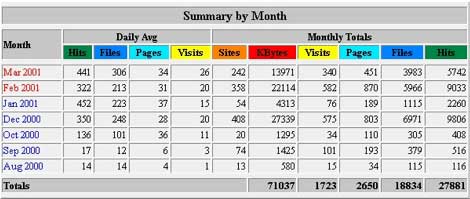
To access your web stats, Login OCC Control Panel, select the domain you wish to view, select Reports, then select Webalizer
Webalizer is updated daily appox 4:00am, and maintains a complete history.
The webalizer shows a over view of each months statistics. If you click the month you will get more detailed information about that month. Below you'll find some of the terms explained.
Hits
Any request made to the server which is logged, is considered a 'hit'. The requests can be for anything... html pages, graphic images, audio files, CGI scripts, etc... Each valid line in the server log is counted as a hit. This number represents the total number of requests that were made to the server during the specified report period.
Files
Some requests made to the server, require that the server then send something back to the requesting client, such as a html page or graphic image. When this happens, it is considered a 'file' and the files total is incremented. The relationship between 'hits' and 'files' can be thought of as 'incoming requests' and 'outgoing responses'.
Pages
Pages are, well, pages! Generally, any HTML document, or anything that generates an HTML document, would be considered a page. This does not include the other stuff that goes into a document, such as graphic images, audio clips, etc... This number represents the number of 'pages' requested only, and does not include the other 'stuff' that is in the page. What actually constitutes a 'page' can vary from server to server. The default action is to treat anything with the extension '.htm', '.html' or '.cgi' as a page. A lot of sites will probably define other extensions, such as '.phtml', '.php3' and '.pl' as pages as well. Some people consider this number as the number of 'pure' hits... I'm not sure if I totally agree with that viewpoint. Some other programs (and people :) refer to this as 'Pageviews'.
Sites
Each request made to the server comes from a unique 'site', which can be referenced by a name or ultimately, an IP address. The 'sites' number shows how many unique IP addresses made requests to the server during the reporting time period. This DOES NOT mean the number of unique individual users (real people) that visited, which is impossible to determine using just logs and the HTTP protocol (however, this number might be about as close as you will get).
Visits
Whenever a request is made to the server from a given IP address (site), the amount of time since a previous request by the address is calculated (if any). If the time difference is greater than a pre-configured 'visit timeout' value (or has never made a request before), it is considered a 'new visit', and this total is incremented (both for the site, and the IP address).
KBytes
The KBytes (kilobytes) value shows the amount of data, in KB, that was sent out by the server during the specified reporting period. This value is generated directly from the log file, so it is up to the web server to produce accurate numbers in the logs (some web servers do stupid things when it comes to reporting the number of bytes). In general, this should be a fairly accurate representation of the amount of outgoing traffic the server had, regardless of the web servers reporting quirks.
Note: A kilobyte is 1024 bytes, not 1000 :)
Top Entry and Exit Pages
The Top Entry and Exit tables give a rough estimate of what URL's are used to enter your site, and what the last pages viewed are. Because of limitations in the HTTP protocol, log rotations, etc... this number should be considered a good "rough guess" of the actual numbers, however will give a good indication of the overall trend in where users come into, and exit, your site.
Referrers
Referrers are weird critters... They take many shapes and forms, which makes it much harder to analyse than a typical URL, which at least has some standardization. What is contained in the referrer field of your log files varies depending on many factors, such as what site did the referral, what type of system it comes from and how the actual referral was generated. Why is this? Well, because a user can get to your site in many ways... They may have your site book marked in their browser, they may simply type your sites URL field in their browser, they could have clicked on a link on some remote web page or they may have found your site from one of the many search engines and site indexes found on the web.
Search String Analysis
The Webalizer will do a minimal analysis on referrer strings that it finds, looking for well known search string patterns. Most of the major search engines are supported, such as Yahoo!, Altavista, Lycos, etc... Unfortunately, search engines are always changing their internal/CGI query formats, new search engines are coming on line every day, and the ability to detect _all_ search strings is nearly impossible. However, it should be accurate enough to give a good indication of what users were searching for when they stumbled across your site.
Visits/Entry/Exit Figures
The majority of data analysed and reported on by The Webalizer is as accurate and correct as possible based on the input log file. However, due to the limitation of the HTTP protocol, the use of firewalls, proxy servers, multi-user systems, the rotation of your log files, and a myriad of other conditions, some of these numbers cannot, without absolute accuracy, be calculated. In particular, Visits, Entry Pages and Exit Pages are suspect to random errors due to the above and other conditions. The reason for this is twofold,
1) Log files are finite in size and time interval, and 2) There is no way to distinguish multiple individual users apart given only an IP address. Because log files are finite, they have a beginning and ending, which can be represented as a fixed time period. There is no way of knowing what happened previous to this time period, nor is it possible to predict future events based on it. Also, because it is impossible to distinguish individual users apart, multiple users that have the same IP address all appear to be a single user, and are treated as such. This is most common where corporate users sit behind a proxy/firewall to the outside world, and all requests appear to come from the same location (the address of the proxy/firewall itself). Dynamic IP assignment (used with dial-up internet accounts) also present a problem, since the same user will appear as to come from multiple places.
For example, suppose two users visit your server from XYZ company, which has their network connected to the Internet by a proxy server 'bt.xyz.com'. All requests from the network look as though they originated from 'bt.xyz.com', even though they were really initiated from two separate users on different PC's. The Webalizer would see these requests as from the same location, and would record only 1 visit, when in reality, there were two. Because entry and exit pages are calculated in conjunction with visits, this situation would also only record 1 entry and 1 exit page, when in reality, there should be 2.
As another example, say a single user at XYZ company is surfing around your website.. They arrive at 11:52pm the last day of the month, and continue surfing until 12:30am, which is now a new day (in a new month). Since a common practice is to rotate (save then clear) the server logs at the end of the month, you now have the users visit logged in two different files (current and previous months). Because of this (and the fact that the Webalizer clears history between months), the first page the user requests after midnight will be counted as an entry page. This is unavoidable, since it is the first request seen by that particular IP address in the new month. For the most part, the numbers shown for visits, entry and exit pages are pretty good 'guesses', even though they may not be 100% accurate. They do provide a good indication of overall trends, and shouldn't be that far off from the real numbers to count much. You should probably consider them as the 'minimum' amount possible, since the actual (real) values should always be equal or greater in all cases. |